
Whether you are an Indian small business or startup, your website or Application will be evolving as your business grows. It could be a new payment method, update to a product page, bug fix or new feature. What if the change you make damages your live site when customers are using it?
It’s a very common issue for businesses that are growing. When you make changes on a live site, you can find your site down, lost orders, broken forms and customers unhappy. This is why it’s beneficial to be aware of the difference between separate development, testing, and production environments.
If you are looking for cloud hosting in India, you can find the facilities to create these environments which will allow you to manage website updates with more safety without making your hosting environment unnecessarily complicated.
Why Do You Need Separate Environments?
Imagine your website is a store. You don’t massively refit the ship or install a new billing system when the regular folk are at the ship’s counter. You would test out the changes in another location first.
The concept of website environments is the same.
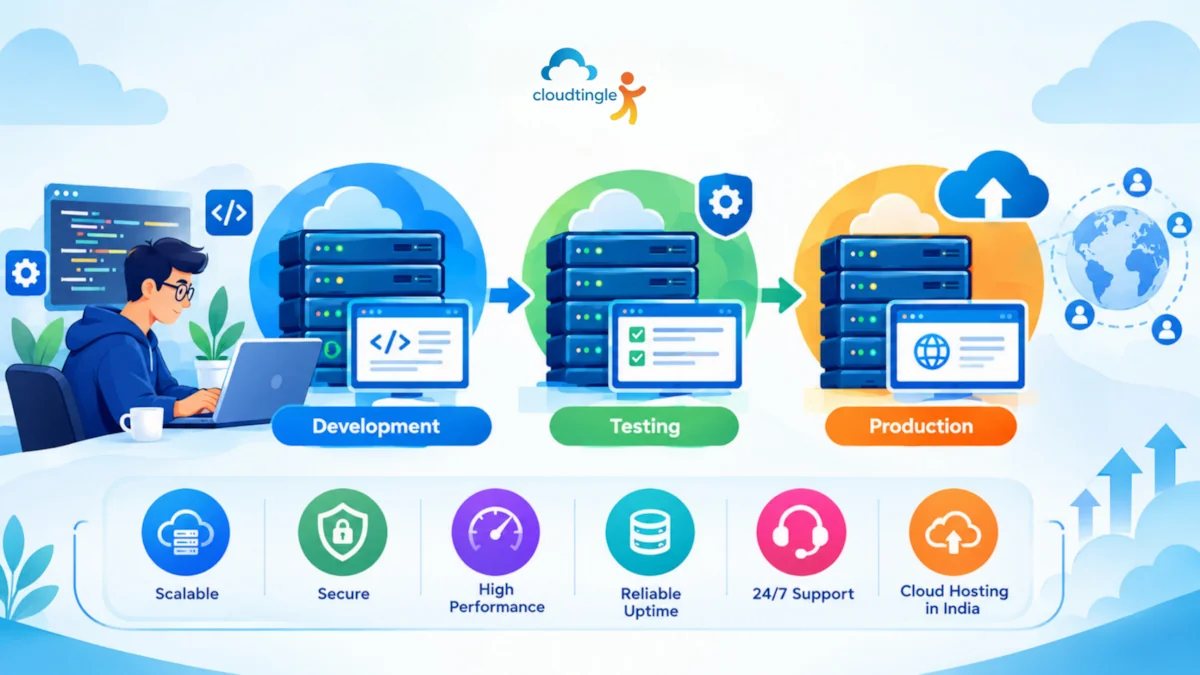
A development environment is the environment where the developer writes the code and creates new functionality. It’s a space to test, mess up and solve issues without actually impacting real customers.
A testing environment is the place where you try to find out if they are working the way that you expect. Can test forms and login, payment integrations, mobile layouts, and other important functions before releasing an update.
A production environment is a real website or application. Consumers come to you and order from the stores, ask questions, and avail yourself of your services.
These situations will be separated and can lead to less chance of incomplete code or unexpected problems that could reach your customers.
Start With A Setup That Fits Your Budget
Many small businesses believe that three costly servers are required to have three separate environments. In practice, it is possible to begin with a more basic one, adding complexity as needed.
In the case of a basic website, it can be developed and tested on a local computer or a shared development server, and then it is hosted on a hosting plan. For an increasing application, it may be advantageous to have separate cloud servers or virtual machines for each environment.
The prices vary based on your application needs, server resources, storage, backup, support and provider. For a general estimate, basic cloud VPS services in India can range from ₹500 to ₹2,000 per month, with the price increasing depending on the level of resources you require. Indicative prices, not market price and taxes/managed services may apply.
You don’t have to pay out the big purchase from the start. Come with adequate resources to your workload and select a configuration that can be expanded in the future with additional resources.
Choose Hosting That Can Handle Real-World Use
Resources that are used in a development environment need not match those of your live application. Your testing environment should, however, be as much like your production environment as possible to show problems before customers.
For instance, a web page could be fast when it has a small amount of data but become slow when hundreds of products or customers are added. In the same way, a feature that works on a developer’s laptop may not do the same on the production server, for various reasons such as software version differences or server configuration differences.
Considering CPU, RAM, storage type, network performance and monitoring resource usage when assessing cloud hosting. While SSD or NVMe storage may provide a boost in storage performance, storage performance is also dependent on application code, database queries, caching, and network performance.
Review provider uptime guarantees and when service is out of reach. The Uptime percentage is helpful but it doesn’t mean your specific website will always be up. Regular monitoring and a good recovery plan are still important.
Build Each Environment Step By Step
You do not need a complicated deployment system to get started. Follow a consistent process.
There’s no need to have a complex deployment process to start. Maintain a standard procedure.
1. Build your development environment: Set up your development environment. Initialise the programming language, framework, database and dependencies that your application depends on. Try to have version control, e.g., Git, so you can go back to the previous version if needed.
2. Set up a testing environment: Establish staging websites or servers that look like production. Staging.example.com is an example of a subdomain that can be used but is not accessible to the public. Do not change its configuration and software versions from what is used in production unless it is impractical.
3. Set up the production environment: This is your actual website. Don’t allow access by unauthorized people, use secure credentials, use HTTPS and never make untested changes on the live system.
4. Facilitate the transition of change in an appropriate manner: Create a feature, test it on staging, resolve all the bugs and deploy the approved version to production. For larger applications, automated deployment tools make for a more consistent process.
5. Keep configuration separate: Database credentials, API keys, email configurations and payment gateway credentials should be set up separately for each environment. Don’t put production tricks into development files or public repositories.
This can help them discover problems sooner, and minimize the chance of unintentionally impacting active customers.
Protect Customer Data And Keep Backups
Even if you have a small website, security should be taken into consideration. Develop and test environments are usually less hardened as production environments, and can become easy targets if they are not hardened.
Utilize strong passwords, multi-factor authentication if available and access as per service’s role. Update server software, frameworks and plugins. Use HTTPS for Websites and secure connection for administrative access.
Take particular care in handling customer information. Don’t use real customer information in development or testing, unless there is a good reason to do so, and appropriate protection measures are in place. Where possible, use sample or anonymised data instead.
Backups are also of paramount importance. Store regular backups of your website files, databases and critical configuration. Back-up separately from the server being protected and regularly check if the back-up can be restored. A backup, that has not been tested before, might not be helpful when you need it the most.
While deploying a major update make sure you have a fresh backup and have a rollback plan. If there are major issues that result from the release, it is important to know how to roll back to the previous working version.
Check Support And Provider Reliability Before You Commit
Even a well-planned setup can run into trouble. A server may become unreachable, disk space may fill up, a database may stop responding, or an update may introduce an unexpected error.
Before selecting a hosting provider, find out what support is included. Is technical assistance available 24/7, or only during business hours? Can you contact the support team through a ticket, phone, or live chat? Does the plan include server management, or are you responsible for troubleshooting the operating system and application environment?
Also review the provider’s reputation, customer feedback, service history where available, and clarity of its policies. Years in business can be a useful signal, but they are not proof of service quality on their own. Look for specific evidence of responsive support and transparent communication.
For a startup without a dedicated system administrator, reliable technical assistance can be especially valuable when something goes wrong outside normal working hours.
Plan For Growth Without Overcomplicating Things
Your first environment setup should support your current needs without blocking future growth. As traffic increases or your application becomes more complex, you may need additional CPU, RAM, storage, monitoring, or a separate database server.
A flexible Cloud Hosting In India plan may allow you to increase resources without rebuilding your entire setup. However, scaling is not always automatic, and some upgrades may require downtime or configuration changes. Ask how resource upgrades work before you need one.
Small teams can start with a simple development workflow and introduce automated testing, deployment pipelines, and more isolated environments as their workload grows. The goal is not to build the most complicated infrastructure. It is to make changes safely and predictably.
Make Your Next Website Update Safer
Separate development, testing, and production environments help protect your live website, reduce deployment mistakes, and give your team more confidence when introducing new features. You can begin with a modest setup, establish a reliable release process, and improve it as your business expands.
If you are considering cloud hosting in India, review your application’s requirements, budget, backup needs, security responsibilities, and support expectations before choosing a plan. Compare a few suitable options and ask the provider how easily you can maintain separate environments.
A little planning now can save your business time, money, and avoidable disruption later.